

Sell Personalized Products & Boost Conversion With Product Add-Ons Module
The Product Add-Ons module helps you offer flexible and personalized choices to your customers. You can provide customized products, service upgrades, extended warranties, gift wrapping options, and many more.
The most unique part is that this module has simple and intuitive control. This allows shoppers to customize their products the way they want. As a result, you’ll witness your sales skyrocket!


Witness How ShopBuilder’s Product Add-Ons Offers Dynamic Customization with Pricing Update
This industry-leading product’s add-ons allow customers to customize their preferred products by including multiple product choices easily.
Product Page With Add-ons
Offer a personalized shopping experience by showcasing product customization fields for each variation on the product page. In these fields, you can add product text boxes for custom details, checkboxes for engraving, or dropdowns for upgrades.
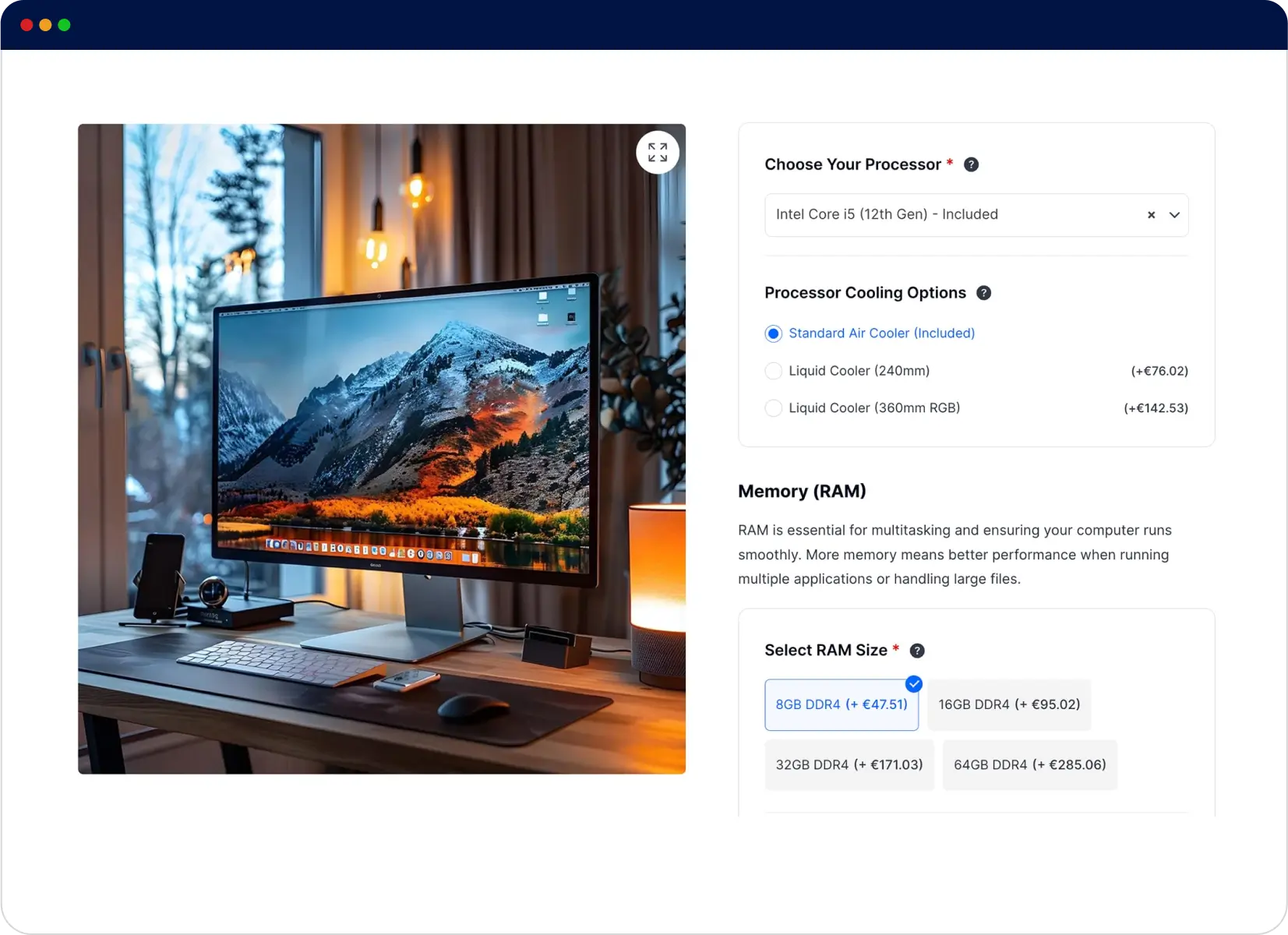

Product Add-ons With Updated Price Box
This feature of the product add-ons module allows customers to personalize products with real-time price updates. When shoppers choose options like custom orders or premium upgrades, a dedicated price box instantly shows the total cost of all selected options.
Add-ons Product on Cart Page
Before checkout, customers see the summary of their customized products with product add-ons on the cart page. By showcasing personalized details with total costs, this feature increases customer satisfaction and eliminates cart abandonment.


Checkout Page With Product Add-ons
Before moving to the payment process, the checkout page showcases the full summary of add-on products with pricing. This page is the last point to review all the selected products. Sometimes, it contains shipping costs and other necessary cost details.
Add-ons Product on Thank You Page
After purchasing, the WooCommerce Thank You Page displays a full summary with all the customized product addons and pricing. This reassures customers that their personalized chosen options are successfully processed.


Product Add-ons Settings
Independently customize the product add-ons position, button label, and other options according to your preference. You can also modify the price box appearance and position as per your requirements.
Global Add-ons Repeater
With this feature, you can set customizable and repeatable fields to multiple products or categories at the same time. This feature is time-saving by defining a group of fields once and reusing them. It also comes with flexible and dynamic options for customers.


Global Add-ons Group Fields
You can insert the field label name, price, and descriptions according to your choice. Moreover, it supports various field types, including text, switches, and radios, and more for versatile and interactive product add-ons.
Customizable Add-ons Style
The most important part is that you can customize the add-ons’ style to match your brand’s theme. You can freely modify the field label tag, font size, description font size, title color, background color, border color, and many more options.


Override Product Add-ons Repeater
You can develop global add-ons for product categories and effortlessly disable or override global add-ons for particular product/s. This is an easy approach to customize product add-ons for some selected products.
Product Add-ons on your WooCommerce Store Ensure More Customization to Excel Average Order Value (AOV)
Get more sales and conversions by increasing the average order value of your store with the help of the
Product Add-Ons module from ShopBuilder.
Unlimited Product Add-Ons
Create unlimited text fields, radio, checkbox, dropdown menu, and more within product/products or product categories.
Organized Add-On Groups
Easily manage product add-ons by assembling product add-ons into different groups.
Assign Specific Pricing for Particular Add-Ons
Add costs to individual add-ons and allow customers to see pricing for each product option when they select that option.
Assign Specific Pricing for Particular Add-Ons
Add costs to individual add-ons and allow customers to see pricing for each product option when they select that option.
Detailed Price Breakdown
Help customers easily understand the value of a product by displaying a detailed price breakdown below the add-ons.
Detailed Price Breakdown
Help customers easily understand the value of a product by displaying a detailed price breakdown below the add-ons.
Helpful Add-On Details
Add additional information or tips to each add-on and help customers make informed purchase decisions.
Role-Based Access to Add-Ons
Display or hide add-ons from users based on their roles and provide exclusive product options to particular customer groups.
Testimonials
Customer Reviews
Read genuine and unfiltered reviews of our customers regarding
our products and services and make informed decisions.
This is the best of the best!
Absolutely unique product.
It is exactly what I am looking for, Great plugin, works exactly as expected.
FAQs
Frequently Asked Questions
ShopBuilder is a top-notch WooCommerce page builder that works in tandem with Elementor and enhances its functionality.
This plugin provides users with an intuitive and user-friendly interface and helps them create and manage professional WooCommerce stores without hassle.
Here are some FAQs about ShopBuilder and its Product Add-Ons module.
Product add-on refers to a product capability/extra features/options that you sell as a separate product option. With a product add-on, you give customers the flexibility to add or remove the product’s additional options and increase the odds of cross-selling.
Install the ShopBuilder plugin, go to its Settings, and then to Modules > Product Add-Ons. Lastly, enable it and start creating product add-ons. That’s how you use product add-ons in your WooCommerce store.
Your WordPress website should meet the following requirements to use ShopBuilder:
PHP: 7.4+ recommended
WordPress: 6.1 or later
Elementor: Latest version recommended
WooCommerce: Latest version recommended

100% Money-Back Guarantee
30-day refund, no questions asked.
Fully Documented
Comprehensive, easy-to-follow solutions.
Expert Support Team
24/7 professional assistance available.